If you have been asking, “How do I get my business on Google?”, this guide will show you what to do without burying you in technical SEO language.
You do not have to become an SEO specialist. You need to help Google answer a few basic questions confidently: Is this business real? What does it offer? Where does it operate? Is its website useful? Can customers trust it?
Once those pieces begin working together, Google has much more information with which to understand your business.
First, Understand How Google Finds a Business
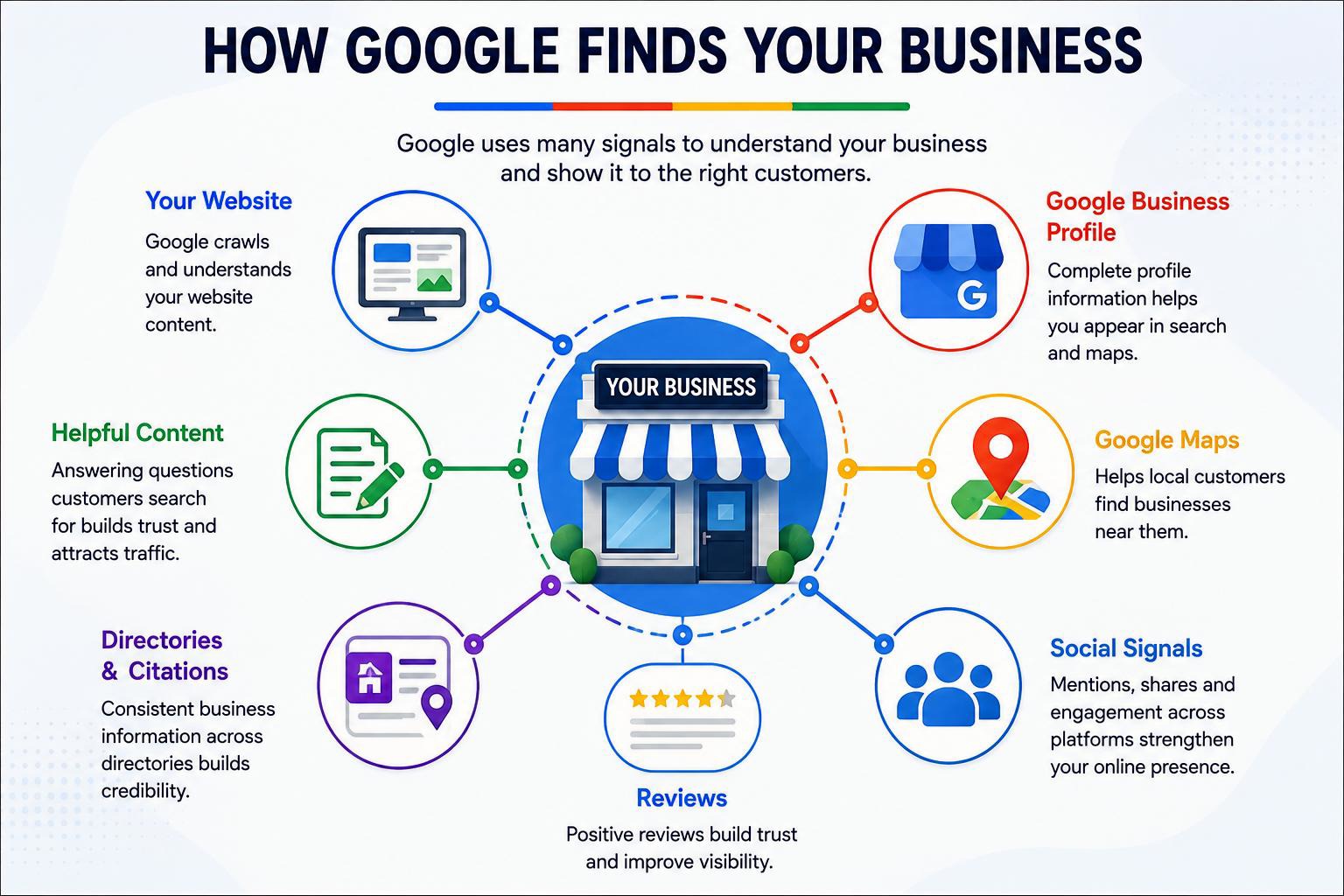
Many beginners assume there is one button that says “put my business on Google.” In reality, your business can appear through several Google surfaces.
Google Search
Your website pages may appear when someone searches for your company name, services, products or questions related to your industry.
Google Business Profile
Your Business Profile can show important information such as your business name, category, contact details, opening hours, photographs and reviews.
Google Maps
Businesses serving local customers can appear when people search for companies, services and places in a particular area.
Google's Local Results
For location-based searches, Google may show selected businesses prominently above or alongside standard website results.
These are connected, but they are not identical. A business can have a Google Business Profile without having a strong website. A website can be indexed by Google without ranking strongly on Maps.
The strongest strategy is to build the pieces together instead of relying on only one.
1. Create a Website Google Can Understand
Your website is your own digital property. Social networks, directories and third-party platforms can help customers discover you, but your website gives you much more control over how your business is presented.
A useful small-business website does not need hundreds of pages. It does need to make the basics extremely clear.
- Your real business name
- What your business does
- Your main products or services
- The locations or markets you serve
- A reliable telephone number and email address
- Your address when customers visit a physical location
- Opening hours where relevant
- An About page
- A Contact page
- Individual pages for important services
- Useful original information for prospective customers
Do not make Google guess what your business does
Suppose you own a plumbing company in Manchester. A homepage containing only:
“Welcome to ABC Solutions. Quality you can trust.”
does not explain much.
A clearer introduction would explain that the company provides residential and commercial plumbing services in Manchester, including emergency repairs, boiler-related plumbing work, leak detection and bathroom installations.
The purpose is not to stuff keywords into every sentence. The purpose is clarity.
If you are completely new to SEO, read AFRIMASTERWEB's SEO guide for beginners after finishing this article.
2. Make Sure Google Can Find and Index Your Website
Having a website does not automatically mean every page is included in Google's search index.
Think of Google's index as an enormous catalogue of webpages Google has discovered and chosen to store information about for possible use in search results.
Before your page can normally appear in organic Google Search results, Google first needs to discover and process it.
Crawling and indexing in plain English
Crawling is the process by which Google discovers and visits webpages.
Indexing happens when Google processes a page and potentially adds information about it to its search index.
Indexing does not automatically mean ranking on page one. It simply gives the page the opportunity to become eligible for relevant searches.
How do you help Google discover your pages?
- Link important pages from your main navigation and other relevant pages.
- Create an XML sitemap.
- Add your website to Google Search Console.
- Submit the sitemap through Search Console.
- Use Search Console's URL Inspection tool when checking important individual URLs.
- Avoid accidentally blocking important pages from search engines.
Google explains that a sitemap tells search engines about pages and files you consider important. Submission is useful for discovery, although submitting a sitemap is not itself a guarantee that every URL will be indexed.
Official resource: Google Search Central: Build and submit a sitemap .
3. Set Up and Optimize Your Google Business Profile
For many local businesses, Google Business Profile is one of the most valuable free visibility tools available.
It is especially important for businesses such as restaurants, shops, hotels, tradespeople, clinics, salons and other organisations that serve customers in defined locations.
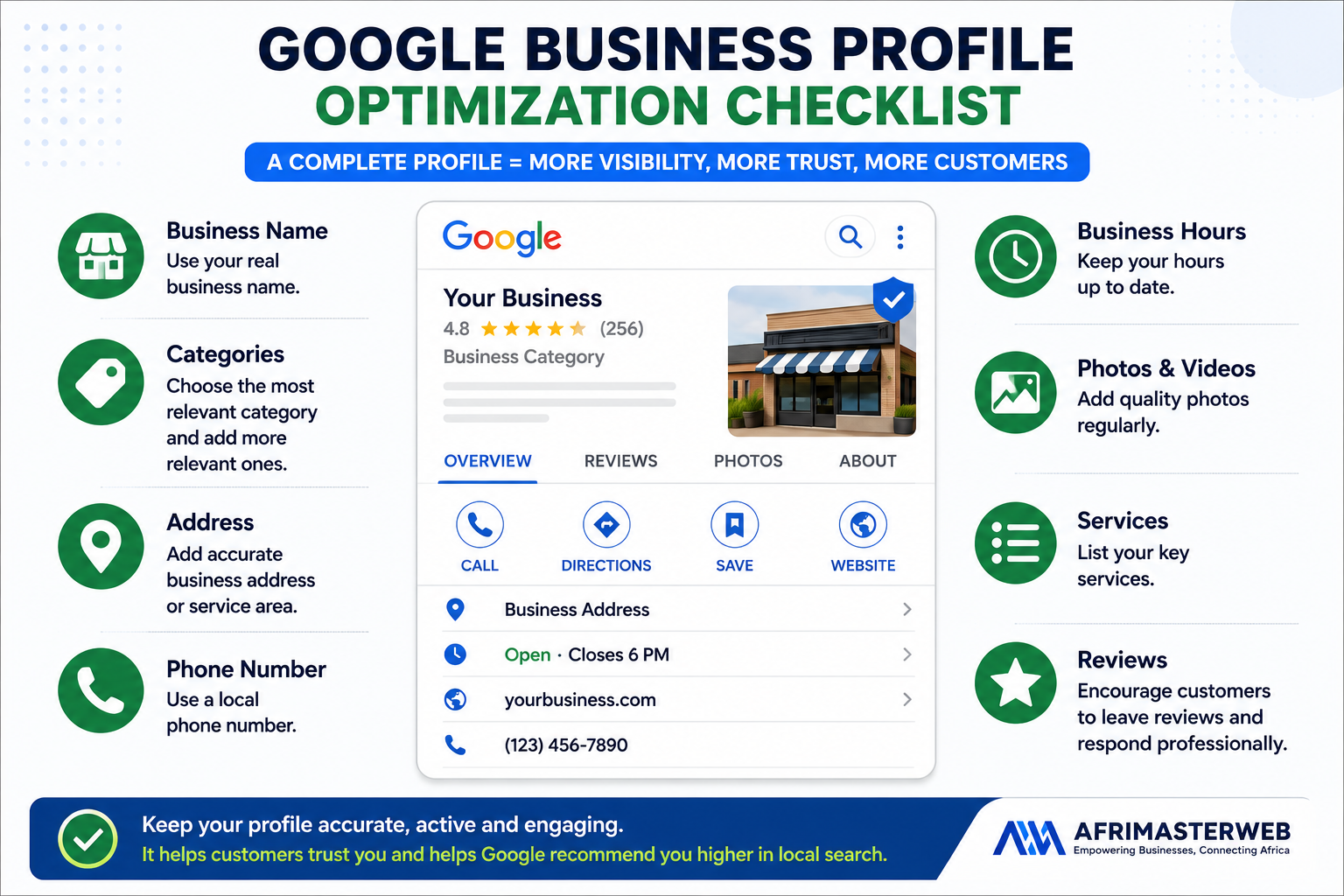
Complete your profile carefully
Depending on your business type and what Google makes available, important profile information can include:
- Business name
- Primary business category
- Additional relevant categories
- Address or service area
- Telephone number
- Website
- Opening hours
- Business description
- Services
- Photographs and videos
- Relevant attributes
- Customer reviews
Google advises businesses to keep their information complete, accurate and up to date. Verified businesses can also manage how important information appears across Google's local products.
Read Google's official guidance: Tips to improve your local ranking on Google .
Choose the most accurate business category
Do not select categories simply because they receive a lot of searches.
Choose the category that most accurately represents what the business actually is. Add relevant additional categories where appropriate, but do not try to describe every product with a category.
Use your real business details
Avoid filling your business name with extra keywords that are not genuinely part of the real-world business name.
Google publishes specific guidelines for representing businesses, and breaking them can create unnecessary problems with a listing.
Official reference: Google Business Profile guidelines .
4. How to Get Your Business on Google Maps
If your goal is “how to get my business on Google Maps,” start with your Google Business Profile.
Once an eligible business profile has been correctly created and verified, Google can use that information within its local search and Maps ecosystem.
But appearing somewhere on Maps and ranking prominently for competitive searches are two different things.
What influences local visibility?
Google describes local results mainly in terms of relevance, distance and prominence.
In practical business language:
- Relevance: How closely does your business match what the person is searching for?
- Distance: How far is the business from the location involved in the search?
- Prominence: How well-known or established does the business appear based on information Google can understand?
You cannot control where every customer is standing. You can improve how accurately and consistently your business is represented online.
Businesses specifically targeting Nigerian customers should also read AFRIMASTERWEB's guide to ranking a business on Google Maps in Nigeria .
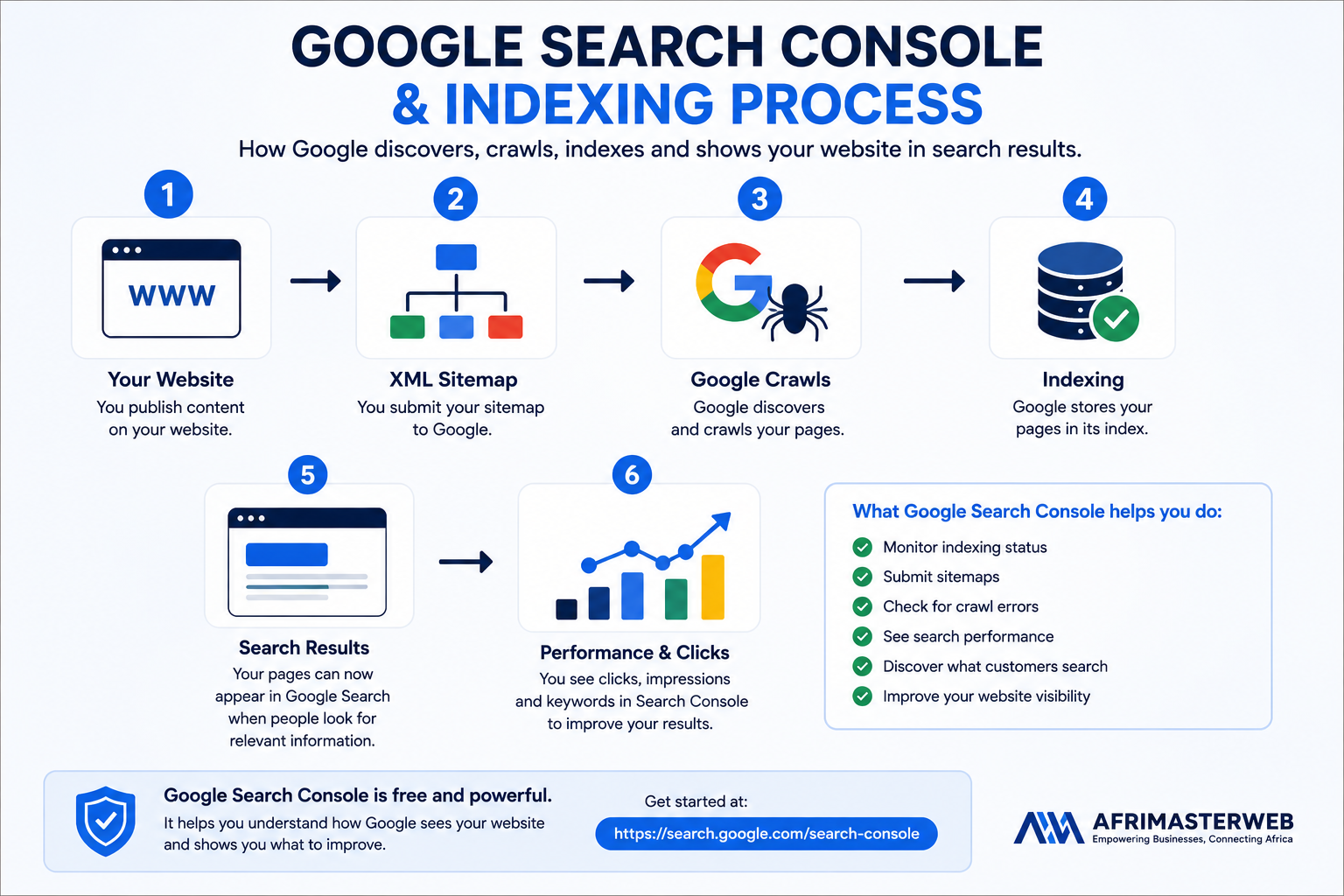
5. Connect Your Website to Google Search Console
Google Search Console sounds technical, but every serious website owner should know the basics.
It is Google's own platform for helping website owners understand how Google Search sees and processes their websites.
Search Console can help you answer questions such as:
- Is Google finding my website?
- Which pages are indexed?
- Which search queries are bringing visitors?
- How many impressions and clicks am I getting?
- Which pages receive search traffic?
- Are there indexing problems?
- Has Google processed my sitemap?
Beginner Search Console setup
- Open Google Search Console.
- Add your website property.
- Complete Google's ownership verification process.
- Submit your XML sitemap.
- Open the Pages/Indexing reports and review obvious problems.
- Inspect important URLs individually when necessary.
- Review Performance data regularly rather than obsessing over it every day.
Official guide: Google Search Central: Get started with Search Console .
Use URL Inspection when an important page is missing
Search Console's URL Inspection tool can show information about Google's indexed version of a URL, test whether a live page may be indexable and allow website owners to request indexing for eligible URLs.
Official reference: Google Search Console URL Inspection .
6. Put Your Business in Relevant Online Directories
Business directories still have a practical role when they are legitimate, relevant and useful to customers.
A directory listing can give search engines another reference connecting your business name with its category, location, contact information, website and services. It can also bring direct human visitors independently of Google.
Choose quality over quantity
Do not buy hundreds of questionable directory links simply because someone promises “instant SEO.”
Prioritize directories that make sense for your actual business:
- Recognised general business directories
- Industry-specific directories
- Local chambers and associations
- Professional organisations
- Local business platforms
- Relevant geographic directories
Add your business to AFRIMASTERWEB
AFRIMASTERWEB provides a business directory designed to help businesses build a stronger online presence and make important business information easier for potential customers to discover.
Explore the AFRIMASTERWEB Business Directory features or start building your AFRIMASTERWEB business presence .
Is Your Business Missing From AFRIMASTERWEB?
Create a business presence that helps potential customers discover what you offer, where you operate and how to contact you.
7. Build Consistent Business Citations
A local citation is simply an online mention of important identifying information about a business.
For many local businesses, the core information is often described as NAP:
- Name
- Address
- Phone number
Your website, business directories, Business Profile and important third-party profiles should not tell contradictory stories.
Example
Imagine one profile lists your company as “Bright Star Plumbing Ltd,” another says “Brightstar Plumbing,” a third has an old telephone number and another shows an address you left three years ago.
Even before considering search engines, that inconsistency is bad for customers.
- Business name
- Address
- Telephone number
- Website URL
- Opening hours
- Business category
- Public email where appropriate
Absolute character-for-character uniformity is not the objective at the expense of natural presentation. What matters is avoiding meaningful contradictions that make it difficult to identify the business correctly.
8. Get Genuine Customer Reviews and Respond to Them
Reviews matter because people trust other people.
When two similar businesses appear in search results, a prospective customer may compare ratings, recent comments, photographs and the way each company responds to customers before deciding whom to contact.
Google also encourages businesses to respond to reviews, and review information forms part of the local-search ecosystem.
How to ask for reviews properly
After a genuine customer has completed a purchase or received a service, make leaving feedback easy.
You can:
- Send your legitimate Google review link after completing the service.
- Include a review request in a thank-you email.
- Place a review QR code at an appropriate physical location.
- Train staff to politely ask satisfied customers for honest feedback.
Do not buy fake reviews
Fake reviews are a poor foundation for a real business.
Do not create fake accounts, purchase fabricated testimonials or pressure customers into dishonest feedback. Build the reputation you want Google and customers to see.
Respond to negative reviews professionally
A negative review is not automatically a disaster. A calm, useful response can show future readers that your business takes customer concerns seriously.
Avoid public arguments. Acknowledge the issue where appropriate, provide useful context without exposing private information and offer a sensible route for resolving genuine problems.
9. Publish Helpful Content Around What Customers Search For
A five-page website can explain your company. Helpful content can help your business appear for a much wider range of searches.
The biggest mistake is publishing articles merely because an SEO tool shows a keyword.
Start with real customer questions.
Imagine you run a removal company
Customers may search:
- How much does a local removal company cost?
- How early should I book movers?
- Do removal companies pack belongings?
- How do I prepare for moving day?
- Can movers transport fragile furniture?
- What should I ask a removal company before hiring them?
Each of those questions can become useful content if you genuinely have something helpful to say.
Service pages also matter
Do not force every search query into a blog post.
If someone searches for “commercial cleaning service in Birmingham,” a well-written commercial cleaning service page may satisfy the intent better than a generic article about cleaning.
For a deeper explanation of how content supports SEO, read The Role of Content Marketing in SEO Success .
10. Strengthen Your Local SEO Without Becoming an SEO Technician
Local SEO is the process of improving your online presence so that people searching for nearby or location-relevant products and services have a better chance of discovering your business.
You do not need to manipulate Google. You need to build strong, understandable signals around the real business.
| Area | What to Do | Why It Matters |
|---|---|---|
| Website | Explain your services and locations clearly. | Helps users and search engines understand the business. |
| Google Business Profile | Complete and maintain accurate information. | Supports visibility across local Google experiences. |
| Maps | Verify eligible location/service information. | Helps potential nearby customers discover the business. |
| Reviews | Encourage genuine customer feedback and respond. | Builds trust and strengthens your public reputation. |
| Directories | Use relevant, reputable directories. | Creates additional discovery opportunities and business references. |
| Content | Answer real customer questions. | Expands the range of useful searches your site may satisfy. |
| Search Console | Monitor performance and indexing. | Shows what Google is actually seeing rather than what you assume it sees. |
Learn more in AFRIMASTERWEB's guide to local SEO and why it matters .
11. Make Your Website Worth Clicking After You Rank
SEO is not finished when someone sees your website on Google.
The next question is whether the search result earns the click, and whether the page convinces the visitor to take action.
Your important pages should make the next step obvious
Depending on the business, that next action may be:
- Call the company
- Request a quotation
- Book an appointment
- Order a product
- Visit the store
- Send a WhatsApp message
- Complete an enquiry form
- Register for a service
Do not hide your telephone number five pages deep. Do not make customers search for a contact form. Do not send visitors to a homepage that fails to explain what you sell.
Traffic is useful. Qualified traffic that turns into customers is better.
Businesses that need help beyond basic DIY improvements can explore AFRIMASTERWEB SEO services and digital marketing services .
12. Common Reasons a Business Is Difficult to Find on Google
Your website is new
A new domain usually has less history and fewer external references than established competitors. Concentrate on building a genuinely useful business presence rather than expecting instant authority.
Your pages are not indexed
Check important URLs in Google Search Console and investigate accessibility, indexing status, quality and internal linking.
Your Google Business Profile is incomplete
Missing categories, incorrect hours, old telephone numbers or incomplete information can weaken the usefulness of your profile to customers.
Your business details conflict across the web
Correct important outdated directory and profile information.
Your website barely explains your services
A beautiful homepage with almost no useful text may leave both prospective customers and search engines with too little context.
You have no reputation signals
A business with no reviews, weak company information and almost no independent references can be more difficult for a prospective customer to trust.
Your content targets the wrong searches
Ranking for a high-volume keyword is useless if the people searching it have no realistic reason to become customers.
Your website is difficult to use on a phone
Customers should be able to read, navigate, call, enquire and complete important actions without fighting the interface.
You copied competitors' content
Build something better. Explain your own services, answer your customers' questions and demonstrate what differentiates your business.
You can also review AFRIMASTERWEB's guide to common SEO mistakes and how to fix them .
13. Website SEO vs Google Business Profile vs Business Directories
Business owners often ask which one they need.
For most serious local businesses, the better answer is not “choose one.” Use them together for different purposes.
| Channel | Main Purpose | Best For | Who Controls It? |
|---|---|---|---|
| Business Website | Explain, persuade and convert | Long-term organic visibility and customer conversion | Your business |
| Google Business Profile | Local discovery | Google Search and Maps visibility | Google platform, business-managed profile |
| Search Console | Search monitoring and diagnostics | Website owners | Google tool |
| Business Directories | Additional discovery and citations | Local, professional and niche visibility | Third-party platform |
| Customer Reviews | Reputation and trust | Helping prospects make decisions | Customers/platform |
| Helpful Content | Answer broader searches | Organic discovery throughout the customer journey | Your business |
14. How Long Does It Take to Get a Business Found on Google?
There is no universal timetable for reaching a particular Google ranking.
A business profile, website page and search result can each move on different timelines, and competitive conditions vary enormously by industry and location.
A plumber competing in a small town is facing a different search environment from a lawyer competing across central London or an international e-commerce website targeting an entire country.
Treat SEO as business infrastructure rather than a one-week campaign.
15. Can You Get Your Business on Google for Free?
Many of the foundational tools discussed here do not require an advertising budget.
You can use Google Search Console without paying Google for organic inclusion, and eligible businesses can create and manage Google Business Profiles without buying Google Ads.
However, running a professional online presence can still involve business costs such as:
- Domain registration
- Website hosting
- Website design or development
- Professional photography
- SEO assistance
- Content production
- Directory upgrades where optional paid plans exist
- Advertising if you choose to run paid campaigns
Do not confuse organic Google visibility with paid Google advertising. They can support the same business, but they are different marketing channels.
Your 30-Day “Get My Business on Google” Action Plan
If this article feels like a lot, do not attempt fifty SEO tactics tomorrow. Start with the fundamentals.
Week 1: Build the foundation
- Check that your website works properly on desktop and mobile.
- Confirm your business name, telephone number, address and contact information.
- Create or improve your About, Contact and core service pages.
- Make sure every important service is clearly explained.
Week 2: Connect with Google
- Create or claim your eligible Google Business Profile.
- Complete verification.
- Add accurate categories, hours, website and contact information.
- Set up Google Search Console.
- Submit your sitemap.
- Check whether your most important pages are indexed.
Week 3: Strengthen trust
- Correct important outdated directory listings.
- Add your business to relevant reputable directories.
- Create or improve your AFRIMASTERWEB business listing.
- Upload genuine business photographs.
- Ask recent genuine customers for honest reviews.
- Respond professionally to existing reviews.
Week 4: Grow visibility
- Write down the 20 questions customers ask most often.
- Choose the most commercially useful questions.
- Improve service pages where the answers belong there.
- Publish one genuinely useful article where a full guide is justified.
- Add relevant internal links between related pages.
- Review Search Console performance data and establish a monthly routine.
Frequently Asked Questions About Getting Your Business on Google
How do I get my business on Google?
Create a website Google can crawl, set up an eligible Google Business Profile, verify the business, connect your website to Google Search Console, submit your sitemap, maintain accurate listings and build helpful content and genuine customer reviews.
How do I get my business to show up on Google Maps?
For eligible local businesses, start by creating or claiming your Google Business Profile, completing verification and providing accurate location or service-area information according to Google's rules.
Why can't I find my business on Google?
Possible reasons include a new or unindexed website, incomplete Business Profile, weak relevance for the search, inconsistent information, strong competition, indexing problems or simply searching from a location where other businesses are considered more relevant.
Do I need a website to be on Google?
Some eligible businesses can have a Google Business Profile without operating a full website. However, a professional website gives you more control over your services, content, brand, enquiries and organic search opportunities.
Does Google Search Console improve rankings?
Search Console is primarily a monitoring and diagnostic tool. It helps you understand how Google crawls, indexes and serves your website, identify problems and view search-performance data. Simply creating a Search Console account is not a shortcut to higher rankings.
How do I know if Google indexed my website?
Use Google Search Console's URL Inspection tool to check individual important URLs and the indexing reports to understand broader website coverage.
Does submitting a sitemap guarantee indexing?
No. A sitemap helps Google discover and understand important URLs, but Google explicitly describes sitemap submission as a hint rather than a guarantee that every submitted URL will be crawled or indexed.
Do Google reviews help a business?
Reviews can strongly influence customer trust and buying decisions. Google also states that review count and review score can factor into local ranking, while helpful owner responses can make a business stand out to prospective customers.
Should I list my company in business directories?
Yes, when the directories are legitimate and relevant. Focus on trusted local, professional, industry and general business directories rather than mass-submitting your details to low-quality websites.
What is NAP in local SEO?
NAP stands for Name, Address and Phone number. Keeping these important business details accurate across your website, Google profile and relevant listings helps customers identify and contact the correct business.
Can I pay Google to rank number one organically?
Google Ads can buy advertising placements, but advertising is separate from Google's organic search rankings. Paying for an advertisement does not purchase a permanent number-one organic ranking.
How often should I update my Google Business Profile?
Update it whenever meaningful information changes. Business hours, holiday hours, phone numbers, locations, services and other important details should remain accurate. Add current genuine photographs and continue responding to relevant customer reviews.
What should I write about on my business website?
Start with what customers need before making a purchasing decision: services, prices or pricing factors where appropriate, locations, processes, common questions, comparisons, requirements, mistakes to avoid and information demonstrating that you understand the customer's problem.
Do I need an SEO company?
Not every business needs an agency immediately. Many owners can handle basic Business Profile updates, Search Console monitoring and content improvements themselves. Professional SEO becomes more useful when competition is strong, technical problems are complex, the website is large or the business needs a structured growth strategy.
What is the most important first step for a new business?
Make sure your fundamental business information is correct everywhere. Then build a useful website, set up your eligible Google Business Profile and Search Console, and begin developing genuine reputation and content around what customers actually need.
Getting Found on Google Is About Building Evidence, Not Finding a Trick
When business owners ask “how to get my business on Google,” the answer is less mysterious than SEO sometimes makes it sound.
Make your business easy to understand. Make your website useful. Give Google accurate information. Keep your public business details consistent. Earn genuine reviews. Publish content that solves real customer problems. Monitor what Google is actually indexing.
Then keep improving.
You do not need to master hundreds of ranking factors before you begin. You need a solid foundation and the discipline to maintain it.
Now Put Your Business Where Customers Can Find It
Reading about visibility will not make your business more visible. Take the next step today.
Create your business presence on AFRIMASTERWEB, explore professional SEO support when you need it, and start making it easier for customers to discover and trust your business online.
Help Another Business Owner
If this guide helped you understand how to get a business found on Google, share it with another entrepreneur or business owner who is struggling with online visibility.
Have a question? Drop a comment below. Tell us what type of business you run, your country and the Google visibility problem you are trying to solve. Your question may also help another reader facing the same challenge.
Already using Google Business Profile, Search Console or business directories? Share what has worked for you. Practical experiences make the discussion more useful for everyone.
Useful AFRIMASTERWEB Resources
- SEO Services That Help Your Business Rank Higher on Google
- AFRIMASTERWEB Digital Marketing Services
- How to Rank Your Business on Google Maps in Nigeria
- Search Engine Optimisation for Beginners
- Technical SEO Checklist
- 10 Common SEO Mistakes and How to Fix Them
- The Role of Content Marketing in SEO Success
- AFRIMASTERWEB Business Directory Features